
Analytics Rewrites to Bypass Ad Blockers
Learn how to get Analytics data from those using Ad blockers - an example for Plausible Analytics on Netlify or Vercel.


•
5 min read
You’re probably missing a ton of analytics data.
Why?
Ad blockers (Ublock, Brave, etc.) all block analytics scripts, even privacy focused ones like Plausible. But you need that data to improve your website.
The simple answer is that you can stop this by using a proxy for your analytics script.
What do I mean?
Instead of your <script> tag calling “plausible.io/js/script.js”, your website instead calls a route on your own domain which you define, like “/api/plausible/script.js”.
Now the client (and ad blocker) just see your website calling it’s own domain, and it’s like “yeah that’s cool no problem”. Then on the server it gets rewritten to the actual analytics script and it runs without issue.
Why Bypass Ad Blockers?
When I was creating cosmicthemes.com, I wanted to be able to collect analytics data on the pages to see where people are going, dropping off, etc. This allows me to see which themes are most popular so I can improve my site and offerings. I imagine you are in a similar situation and that’s how you ended up here.
What I quickly discovered in testing, is that my ad blocker was blocking the Plausible analytics script. But wait, isn’t this a privacy focused analytics tool? Yes it is, but it was still getting blocked. So naturally I wasn’t too excited about this.
Now, we can debate the ethics of getting around ad blockers, but that is not what this post is about. All I’ll say about it, is that in my case I’m using Plausible analytics, which is GDPR compliant with no cookies. So user privacy is already respected.
Using Rewrites
I did this using Netlify and Plausible, although similar things can be implemented in Vercel or other providers, and other analytics tools.
INFO
Note: Here I am using routes at /api/plausible/, although you could replace that with /stats/ or anything else you prefer.
HTML Changes
Standard Plausible script:
<script
  defer
  data-domain="yourdomain.com"
  src="https://plausible.io/js/script.js"
></script>
New Plausible script to support rewrites.
<script
  defer
  data-domain="yourdomain.com"
  data-api="/api/plausible/api/event"
  src="/api/plausible/js/script.js"
></script>
Netlify Rewrites
For Netlify, they have a redirect / rewrite feature built into their netlify.toml configuration file. This will allow us to rewrite our custom routes like /api/plausible/* to the actual Plausible scripts.
Add the following to your Netlify.toml file:
[[redirects]]
  from = "/api/plausible/js/script.js"
  to = "https://plausible.io/js/script.js"
  status = 200 # ok code
  force = true # ensure to always redirect

[[redirects]]
  from = "/plausible/api/event"
  to = "https://plausible.io/api/event"
  status = 200 # ok code
  force = true # ensure to always redirect
Starwind UI
I've learned a lot developing with Astro. So I crafted 37+ animated and accessible components to help you get started with your next project. Inspired by shadcn/ui with seamless CLI installation. Free and open source.
Vercel Rewrites
For Vercel you can use their configuration file vercel.json to add rewrites below:
{
  "rewrites": [
    {
      "source": "/api/plausible/js/script.js",
      "destination": "https://plausible.io/js/script.js"
    },
    {
      "source": "/api/plausible/api/event",
      "destination": "https://plausible.io/api/event"
    }
  ]
}
CAUTION
I did not test this, however I wanted to include it here in case you are using Vercel. I got this information from the Plausible docs and Vercel docs
Other Rewrites
Plausible has documentation for various methods which you can view here.
Test your Rewrites
Now you should verify you have everything setup properly to get around ad blockers. I recommend using Brave browser with Ublock also installed to test.
Open your deployed site with rewrites in place. Open up the dev tools and go to the network tab. You should be able to find the script “scriptname.js” in there. You also shouldn’t see any indication of anything being blocked by Ublock Origin.
Then go to your Plausible dashboard and verify it is you accessing it. You can navigate to a few different pages, refresh your dashboard, and see that those pages have been accessed an additional time.
Don’t Skew Your Data
Now that you’ve tested the rewrites, you should add a custom Ublock filter so you don’t skew your own data.
For Ublock, right click on the extension and select “options” and go to the “My filters” tab. Then add a custom rule to block the routes you made. All you need to do is add a line like yourdomain.com/api/plausible/*, and click “Apply changes”.
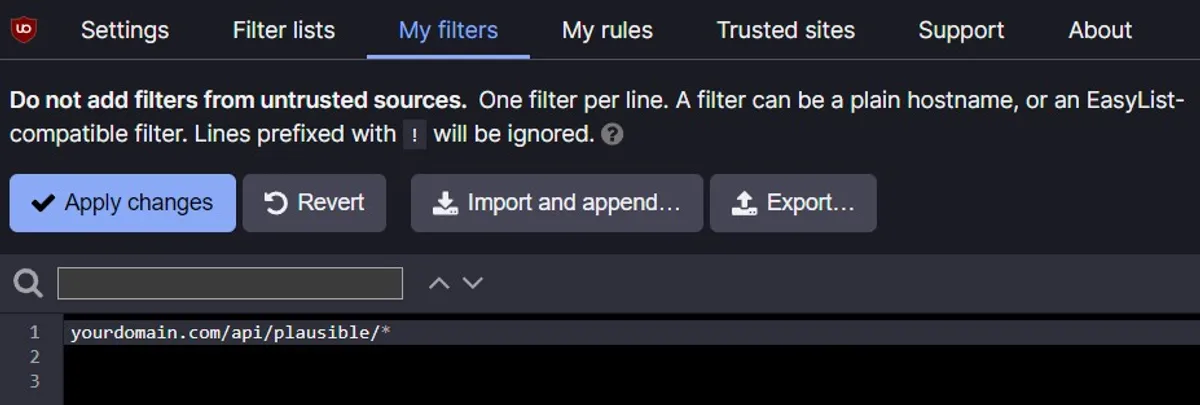
Then test by seeing if the ad blocker blocks anything, or look in the network tab for a blocked script. Note that this will have to be on your deployed site or on a Netlify dev environment so the rewrite rules you setup are actually in effect. Otherwise you’ll see 404 errors logged to the console that your custom route doesn’t do anything.
TIP
If you want to test in the future you can always temporarily disable your ad blocker.
Great Success
Now you can bypass ad blockers by using rewrites so you can get your needed web analytics data. Remember, with great power comes great responsibility. Great success. 🚀
Don't forget to follow me on Twitter for more Astro, web development, and web design tips!